Choose a Plan and Credit Pack
Diperbarui 9 Sep 2026
What you will complete
Compare required features, file sizes, and output limits, then choose monthly or annual billing. Check current prices on the pricing page and final checkout screen.
1. Identify required features
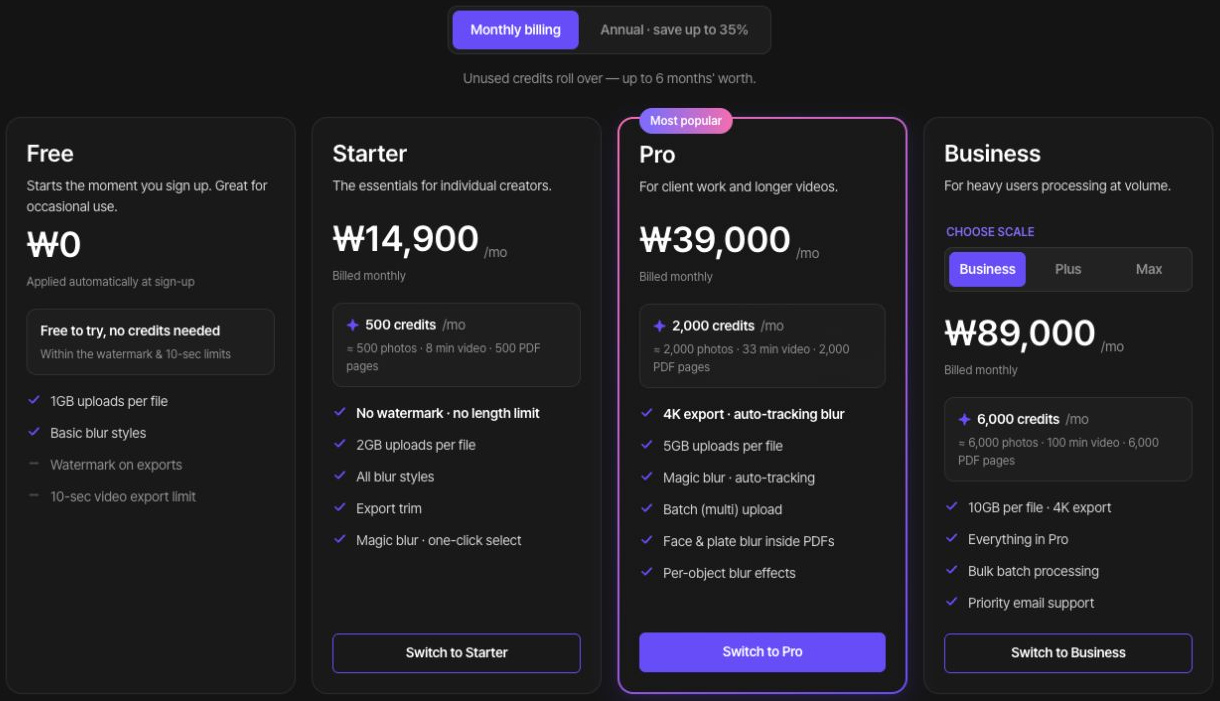
Your account plan and credits cover photo, video, and PDF work rather than separate subscriptions for each studio. The current comparison lists Magic Blur selection and background effects from Starter, and video Magic tracking, multi-upload, per-target effects, and PDF face and plate processing from Pro. Also check any upgrade notice on the feature you intend to use.
2. Compare file and output limits
Compare your largest upload, video duration, and required resolution. Free includes a watermark, a 10-second video export limit, and up to 1080p. Starter lists up to 1080p; Pro and Business list up to 4K.
3. Compare billing and credit cycles
Select monthly or annual billing and read the actual billed total and credit issue schedule. An annual plan’s monthly equivalent is not a monthly charge. Current tiers list 500 credits/month for Starter, 2,000 for Pro, and 6,000 for Business, with larger Business sizes available.
4. Cover occasional credit shortages
If subscribed, check available credit packs. Review quantity, total price, and how the purchase relates to your balance. Do not assume a pack upgrades feature access or upload limits. Compare a higher plan if you regularly run short.
5. Verify after checkout
Read the currency, tax, total, and renewal conditions before confirming. After completion, check Billing and plans in Account settings and the dashboard balance. If the plan remains unchanged after a payment message, review payment history before purchasing again.
Check current plans and limits