Change a Payment Method and Resolve Failed Payments
更新於 2026年9月9日
What you will complete
Update a subscription payment method or investigate a failed payment, then check payment and subscription status.
1. Check the current status
From your profile menu, open Account settings and check Billing and plans and Payment history. Note the failed payment’s time, amount, and message. Do not put a full card number or security code in a support request.
2. Change the payment method
In Billing and plans, open the … menu beside Change plan and choose Change payment method.
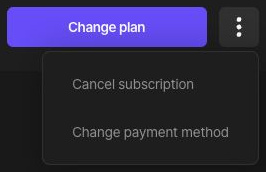
Enter and save the new method on the payment provider’s screen. Check its completion message and return to BlurMe. Follow the actual options the provider offers.
3. Check the failure reason
Check expiry, balance or limits, online or international recurring-payment permissions, and any additional bank authentication. Complete required authentication. For a temporary error, recheck the payment status and use an offered retry action.
4. Verify renewal
Updating a method alone does not prove an outstanding payment succeeded. Check Payment history for success and Billing and plans for the next billing date and plan status. Review existing approvals before repeatedly trying to pay.
If it still fails
Contact support with your account email, payment time, displayed error, and whether you updated the method. Do not send a full card number, security code, or password.